Physical Address
304 North Cardinal St.
Dorchester Center, MA 02124
Physical Address
304 North Cardinal St.
Dorchester Center, MA 02124
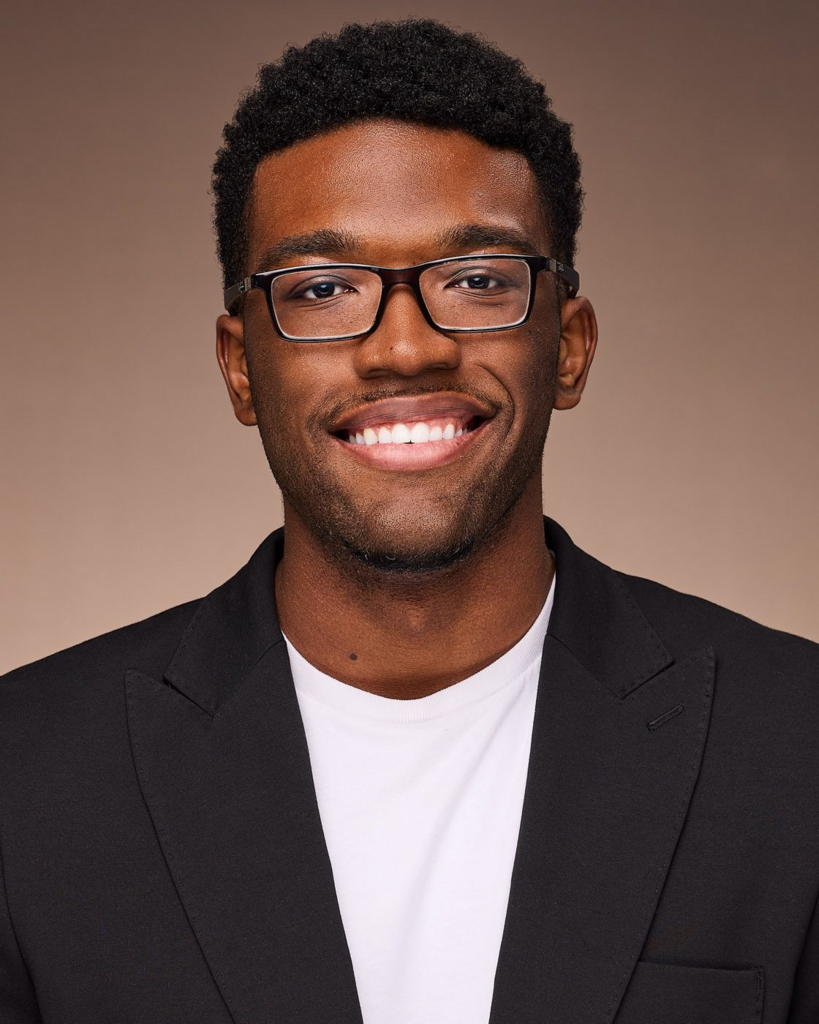
Getting a professional headshot used to mean booking a studio, coordinating schedules, and paying a photographer by the hour. For remote teams spread across different cities and time zones, that process was never realistic. Most teams just quietly gave up on visual consistency.
AI headshot generator tools have changed that. Entirely. And if you’ve never used one before, the learning curve is shorter than you’d expect — this guide walks you through it from scratch.
What’s worth knowing upfront: an AI professional headshot generator today can take a single casual photo and turn it into a polished professional portrait in seconds. That used to sound like a marketing copy. Now it just happens to be accurate.
| Feature | Details |
| Generation speed | 6–15 seconds per image |
| Input requirements | Min 1 photo; max 4 for stronger accuracy |
| Scene options | 20+ scenes |
| Access model | Anonymous unlimited (basic); registered users get advanced (4x/day) |
| Key limitation | Variable likeness on basic model; possible over-smoothing on skin |
Early AI portrait tools worked by blending features from a large dataset of existing headshots — and the results were unpredictable. If your photo didn’t closely match the training data, you’d get something that looked more like a composite than a portrait of an actual person.
Current tools use identity-preservation techniques that anchor the generated image to the specific facial features in your source photo. That shift is what makes modern output genuinely useful. The image looks like the person, not a stylized approximation of one.
Speed followed. What once took several minutes now takes seconds. A 6–15 second generation window makes the experience feel interactive rather than something you wait through — and that changes how willing people are to iterate. Scene variety has advanced alongside both: earlier versions offered a handful of generic office backdrops, while platforms today routinely support 20 or more distinct settings, from corporate boardrooms to outdoor environments, giving teams real flexibility across different roles and use cases.
Not every AI headshot generator performs at the same level. For distributed teams where visual consistency actually matters, a few qualities separate effective platforms from frustrating ones.
Minimal input requirements matter most. Asking remote employees to hunt for a specific type of photo adds friction before anything has even started — and the fewer steps required upfront, the higher the completion rate across a whole team. Transparency about limitations is equally important. Reliable tools are upfront about where accuracy might vary, for instance noting that single-photo input produces less consistent likeness than uploading several images. That honesty helps users calibrate expectations rather than feel let down by the output.
Access model and scene range round out the picture. Forcing account creation before a single result is generated creates a real adoption barrier, especially with distributed teams where technical comfort varies. And when a team shares no physical environment, visual cohesion has to come from the tool — which is why a broad scene library matters more than people initially expect.
HeadshotMaster is an AI Headshot Generator designed with a deliberately low barrier to entry. For remote teams and first-time users, that philosophy shows up most clearly in how little the tool requires before generating a result.
The minimum input is one photo. That’s it. No studio setup, no specific camera, no carefully staged lighting. A clear, front-facing photo of your face is enough to begin — and for most people, that’s genuinely all they’ll ever need.
This matters more than it might initially sound. In practice, when HR teams roll out headshot projects across distributed offices, the biggest obstacle often isn’t the tool itself. It’s getting everyone to actually submit an acceptable photo. When the requirement is simply “one photo,” that obstacle mostly disappears.
HeadshotMaster supports up to four input images, and using more generally improves likeness accuracy. Think of the single-photo minimum as the floor and four photos as the ceiling — both work, but more input typically produces stronger results. For high-visibility uses like executive profiles or speaker bios, uploading a few different shots is worth the extra minute.
Here’s a casual observation worth sharing: most people assume they need a “good” photo to get a good result. In reality, the tool does a surprising amount of work from even mediocre input. It’s one of those things you have to try before you actually believe it.
Images generate in 6–15 seconds per output. For a beginner, that speed makes the whole process feel low-stakes — you see a result almost immediately, adjust if needed, and try again. What could feel like a slow, technical workflow starts to feel more like browsing options.
Fast iteration also reduces the pressure on any single attempt. When results take seconds rather than minutes, people are far more likely to experiment with different scenes or lighting variations, which almost always leads to stronger final selections than going with the first image that loads.
With 20+ scenes available, HeadshotMaster covers a wide range of professional contexts. Corporate boardrooms, creative workspaces, neutral studio environments, outdoor settings — the variety is broad enough that teams with different internal aesthetics can find something that fits without needing multiple tools. A developer, a salesperson, and a creative lead might each want a slightly different look, and the scene library is built to accommodate that.
The basic model runs anonymously, with unlimited usage and no login required. For team rollouts, this is a meaningful practical advantage — a manager can share a single link, and every employee generates headshots on their own schedule without creating an account first.
Registered users unlock the advanced model at four generations per day. The structure creates a natural progression: try it anonymously, decide whether more refined output is worth it, and register only if that makes sense. That gradual commitment works well in workplace rollouts, because it doesn’t force a decision before someone knows whether the tool actually fits their needs.
HeadshotMaster’s basic model can produce variable likeness results, particularly with single-photo input. A blurry or poorly lit source photo tends to deliver less reliable output — but this is a manageable constraint, not a hard ceiling. Being thoughtful about which photo you upload resolves most of the variability.
Skin smoothing is the other notable limitation. The processing can sometimes lean over-polished, which shows up most in portraits aimed at a natural or editorial feel. For standard corporate headshots, where clean and professional is the expectation, this rarely registers as a problem. For anyone with a specific stylistic preference, reviewing the output before finalizing takes only a few extra seconds and is generally worth it.
Remote teams are the obvious use case, but the practical audience extends well beyond that label.
HR and operations teams running onboarding projects across distributed offices often struggle with something that sounds simple: getting a consistent set of photos from people who’ve never shared a physical workspace. A no-login tool with a one-photo minimum solves that in a way that calendar coordination and photographer bookings never could. Employees handle it on their own time, and the tool standardizes what the process itself cannot.
Freelancers and consultants face a different version of the same problem. A professional photo shouldn’t require hiring someone, but it also shouldn’t look like a cropped vacation shot. The gap between those two options — polished enough for a proposal or platform profile, accessible enough to update whenever needed — is exactly where an AI professional headshot generator fits naturally into someone’s workflow.
Startups building a team page run into visual inconsistency fast. Everyone’s photos were taken in different rooms, with different lighting and different cameras. Standardizing that across even a small team through traditional means is expensive and logistically painful. Running everyone through the same tool with a shared scene takes roughly as long as the meeting where you decide to do it.
Marketing teams, for their part, manage employee profiles across multiple surfaces simultaneously — internal directories, company websites, event pages, press kits. Maintaining visual consistency across all of those without a centralized process is harder than it looks from the outside. And then there’s a group that often gets overlooked entirely: people who just want to update a LinkedIn photo without committing to a paid subscription or creating an account they’ll never use again. Anonymous, unlimited access meets that need directly, without friction, and without any obligation.
AI-generated headshots have moved past the novelty phase. For remote teams, they solve a practical, recurring coordination problem — and they do it without requiring scheduling, travel, or meaningful budget.
The beginner path is genuinely simple. Start with one clear photo. Choose a scene that fits the context. Review the result, iterate if needed, move on. For most users, that’s the entire workflow.
For teams evaluating options in this space, an AI professional Headshot Generator that supports single-photo input and anonymous unlimited access removes the two friction points that most commonly stall remote rollouts: photo requirements and forced account creation. The AI professional headshot generator category continues to develop quickly, and what’s available right now is already capable of meeting most professional needs well. If a team headshot update has been sitting on your to-do list because the logistics felt too heavy, this is a reasonable, low-friction place to start.