Physical Address
304 North Cardinal St.
Dorchester Center, MA 02124
Physical Address
304 North Cardinal St.
Dorchester Center, MA 02124
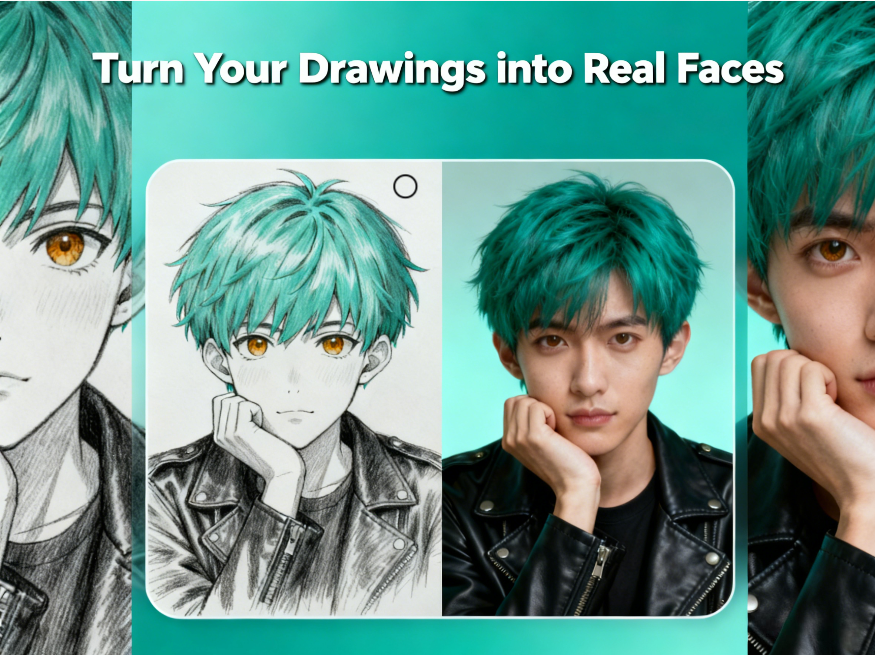
Many artists create original anime characters or hand-drawn illustrations, but it can be challenging to imagine how these characters would look in real life. Thanks to Anime to Real Life feature, creators can now instantly transform their drawings into realistic portraits, bridging the gap between imagination and reality. By leveraging AI technology, users can see their characters come to life with facial features, skin tones, and hairstyles rendered in a lifelike way.
This article explores why traditional methods of visualizing original characters fall short, what artists and fans need to see their creations in real life, and how Anifun makes it fast, easy, and accurate.
Traditional drawing software allows artists to create characters in 2D, but visualizing them in a realistic 3D-like context requires advanced skills that most fans or hobbyists don’t have.
Anime characters often have exaggerated features such as large eyes, stylized hair, or unusual proportions. Translating these features into realistic human faces can be difficult and time-consuming.
Even with photo-editing software, manually adjusting facial proportions, skin tones, and hair textures to make a character realistic is labor-intensive and requires a high level of technical skill.
Artists often need immediate feedback to experiment with different styles or variations. Waiting for professional renderings or manually testing adjustments slows down the creative process.
Creators want a tool that quickly converts their drawings into realistic faces, preserving unique character traits while adding lifelike details.
Output images should capture the character’s distinctive eyes, mouth, hairstyle, and expressions, so the resulting portrait still feels like the original creation.
Users benefit from generating several versions with different angles, expressions, or slight adjustments to explore alternative looks for their characters.
The tool should be online, browser-based, and simple to operate, so artists can use it anytime without installation or complicated setups.
Seeing characters in realistic form can help writers and creators refine their stories, design better visuals, or create marketing materials for games, comics, or social media.
Users start by uploading their original anime or hand-drawn character images, whether scanned sketches, digital art, or fan creations.
Anifun’s AI analyzes facial structure, hair, and features, generating a realistic portrait while keeping the character’s identity intact.
Creators can adjust skin tone, lighting, hairstyles, and background to refine the realism and match their vision.
The AI allows generation of several realistic versions, giving artists options to select the most compelling or suitable portrait for their needs.
Results can be downloaded or shared on social media, used for storytelling, portfolio building, or collaborative projects with other fans and creators.
Anifun works directly in the browser on PC, Mac, tablet, or mobile, without installation or account setup, making it fast and accessible.
High-resolution drawings allow the AI to capture finer details, resulting in more accurate realistic faces.
Ensure the character’s eyes, hair, and facial expressions are clear to maintain identity in the transformation.
Generating multiple angles and expressions can help visualize the character in different real-life contexts.
Realistic shadows, lighting, and backgrounds improve the overall believability of the transformed image.
Testing multiple outputs helps creators select the best version for cosplay inspiration, storytelling, or social media presentation.
Anifun Anime to Real Life makes it effortless for artists and fans to transform original drawings into realistic faces. Free, online, and easy to use, it preserves the essence of your characters while adding lifelike details. Whether for storytelling, cosplay planning, or creative exploration, Anifun bridges the gap between imagination and reality.
