Physical Address
304 North Cardinal St.
Dorchester Center, MA 02124
Physical Address
304 North Cardinal St.
Dorchester Center, MA 02124

I had just finished a long client interview for a website project. The recording was only 45 minutes, but turning that conversation into organized notes took almost two more hours.
The frustrating part was not the typing itself. It was constantly replaying the same sections, searching for specific ideas, and trying to remember where a useful sentence appeared.
As a freelance designer who charges based on project time, small inefficiencies add up quickly. I started looking at transcription differently. The problem was not simply converting audio into text. The real challenge was turning spoken information into something I could actually work with.
Many people approach video transcription by focusing only on accuracy. From my experience, the bigger question is what happens after the words appear on the screen. A transcript becomes valuable when it helps organize ideas, create content, or support decision-making.
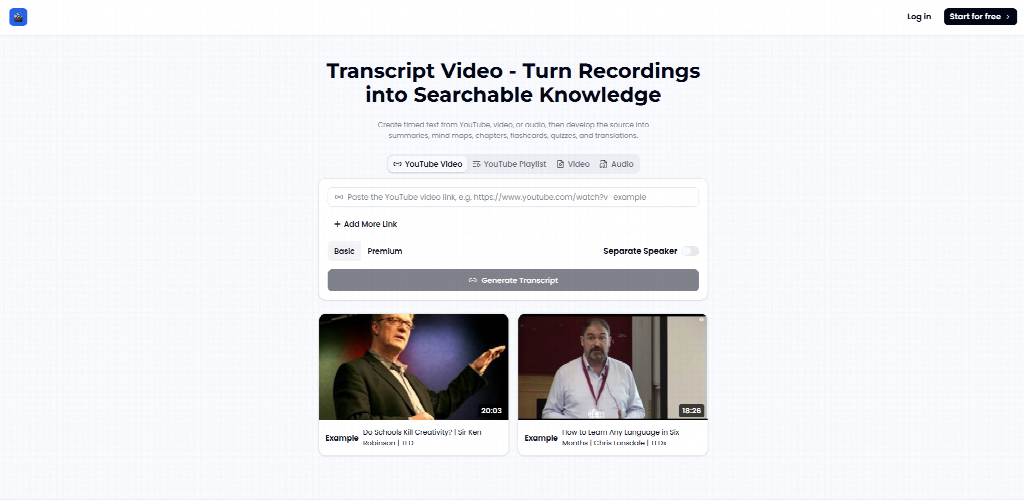
After testing different workflows, I found that avoiding a few common mistakes made a bigger difference than simply choosing a transcription tool. This is how I learned to work with Transcript Video as part of my design process and content workflow.
The first mistake I made was treating a transcript like a finished document. I thought the goal was simply to get every spoken sentence written down.
That mindset made the process feel incomplete because raw transcripts are often messy. Conversations include repeated words, unfinished sentences, and ideas that only make sense with context.
A transcript is more useful as a source of organized information. It creates a searchable version of a recording, but the real value comes from what you do afterward.
For example, when I interview clients about website projects, the recording usually contains scattered thoughts about brand style, customer problems, and design preferences. A transcript gives me a place to find those details without listening again from the beginning.
Tools like TranscriptVideo are designed around this idea: create the transcript once, then turn spoken material into more focused working assets.
I now treat transcription as the first stage of my workflow. After generating text from a recording, I review it for important themes, decisions, and action points.
Instead of asking, “Is this transcript perfect?” I ask, “What can I create from this information?”
That small change helped me move faster because I stopped expecting the transcript itself to solve every problem.
Another common mistake is assuming AI transcription can fix any recording problem.
I used to upload every file without thinking about audio quality. If the result was unclear, I blamed the tool.
The quality of the original recording still matters. Background noise, multiple people speaking at once, and unclear pronunciation can affect the final text.
This is similar to design work. A better tool cannot completely replace good input. A blurry image will still need attention, and a noisy recording will still require review.
According to Wyzowl’s video marketing research, video continues to be a major communication format for businesses, with many organizations using video as part of their marketing and education strategies. This growth also creates a larger need for better ways to organize spoken information after recording.
The lesson I learned was simple: transcription quality starts before the upload button.
Before recording important conversations, I now check three things:
These small adjustments often save more editing time later.
For a client interview, spending two minutes improving recording conditions can prevent twenty minutes of transcript corrections.
Before using transcription tools, I thought watching the original video was the safest way to understand everything.
For important projects, I would replay full recordings multiple times because I worried about missing details.
Repeated viewing is not always the most efficient way to review information. Sometimes I do not need the entire conversation. I only need one specific answer.
A searchable transcript changes the process. Instead of remembering where something was mentioned, I can scan written content and locate relevant sections much faster.
This was especially useful during a branding project where a client explained their preferences during a long discussion. Previously, finding one sentence about their preferred visual style could take several minutes of searching.
After changing my workflow, I reduced a two-hour review process to around 40 minutes for similar projects.
My current method is:
First, generate the transcript.
Second, scan for important topics and keywords.
Third, return to the original recording only when I need tone, emotion, or visual context.
The transcript does not replace the video. It helps me decide which parts of the video deserve attention.
When people discover a new tool, there is often a temptation to use every available function.
I had the same habit. I wanted to explore every option because I assumed more features meant better results.
One surprising lesson was that sometimes the best feature is the one you choose not to use.
For example, additional formatting or transformation options can be useful, but not every project needs extra processing. In some cases, keeping the original transcript simple makes review easier.
This was unexpected because I initially thought more automation would always improve my workflow.
Instead, I found that unnecessary adjustments could create another editing layer.
I now start with the simplest goal:
“Can I find and organize the information I need?”
If the answer is yes, I stop there.
For client notes, research material, and early design planning, a clean transcript is often enough. Extra processing only makes sense when it supports a specific outcome.
Many people think transcripts are mainly for subtitles or accessibility.
While those uses are important, they represent only one part of the potential workflow.
A recorded conversation can become many different types of content.
A client interview can become project notes. A podcast can become article ideas. A tutorial can become a written guide.
As a designer, I discovered an unexpected use case: reviewing old project discussions to understand recurring client questions. These conversations helped me identify patterns that influenced future website structures.
The transcript became a research archive instead of a temporary file.
I save useful transcripts with project materials and label them by topic.
Over time, these documents become a searchable knowledge base.
This approach is especially helpful for freelancers because previous conversations often contain valuable insights that are forgotten after a project ends.
Transcript tools are not equally useful for everyone.
For video creators, they can simplify the process of turning recordings into articles, descriptions, or notes.
For educators, transcripts can make lessons easier to review and organize.
For businesses, searchable recordings can help teams remember decisions from meetings and interviews.
For freelancers like me, the biggest benefit is protecting focused work time. Every hour saved on administrative tasks is an hour that can go toward creative work.
The important point is that transcription is not only about saving typing time. It is about making information easier to revisit.
The amount of recorded information continues to increase. Meetings, interviews, online courses, and customer conversations all create valuable data.
However, information that stays inside video files is difficult to search and reuse.
The shift from video archives to searchable knowledge systems changes how people work. Instead of storing recordings and forgetting them, teams and individuals can build a more accessible information library.
This is where transcription becomes more than a convenience. It becomes a method for organizing human communication.
After using this workflow for real projects, I realized the main benefit was not simply getting words on a page faster.
The bigger change was reducing the distance between a conversation and an actionable idea.
A recording captures a moment. A transcript gives that moment a structure. The difference is what allows information to be found, reviewed, and reused later.
For me, the most valuable lesson was that good tools do not remove the thinking process. They create more space for better thinking.
