Physical Address
304 North Cardinal St.
Dorchester Center, MA 02124
Physical Address
304 North Cardinal St.
Dorchester Center, MA 02124

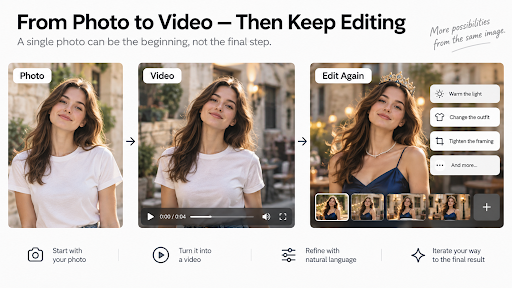
For a long time, image-to-video workflows were mostly one-way.
You chose a photo, wrote a prompt, generated a clip, and judged the result. If the motion felt wrong, the lighting was off, or the scene needed a different treatment, the usual response was to go back to the starting image and try again.
That made the original photo carry a lot of responsibility. Composition, lighting, subject clarity, and background separation all shaped what the generated video could become.
Newer AI video workflows are changing that relationship.
The photo still matters, but it is increasingly becoming the beginning of an editable sequence rather than the last moment when the creator has meaningful control.
A useful way to think about the shift is to separate generation from revision.
The first step still starts with the image. The model uses it to establish the subject, environment, visual style, and spatial relationships that define the clip.
But after the video exists, some systems now allow the creator to keep working on that result through natural-language edits.
Instead of rebuilding the entire scene from scratch, the creator can ask for a targeted change: warmer light, a different background treatment, a new object, a revised camera angle, or a change to the action.
The important word is targeted. The goal is to preserve as much of the useful scene as possible while changing the part that needs attention.
That does not mean every other detail is guaranteed to remain identical. Generative edits can still introduce drift. But the workflow is fundamentally different from treating every revision as a completely new generation.
For photographers, product shooters, and designers, the change affects how the source image is used.
The photograph no longer has to encode every final creative decision.
It still needs to establish a strong subject and a readable scene. A clear product silhouette, a recognizable face, sensible framing, and useful depth cues remain valuable because those are the visual facts the model starts from.
But some decisions can now happen later in the process.
A creator may begin with a clean product image, generate a short clip, then refine the scene after seeing it in motion. The first pass may reveal that the background is too distracting, the light direction feels flat, or the camera treatment does not fit the campaign.
Those are easier decisions to make once the image is moving.
That makes the source photo less like a finished poster and more like a strong base layer for a sequence of creative decisions.
Natural-language editing is where this workflow becomes most useful.
Gemini Omni, for example, supports iterative video editing through conversation. A creator can ask for a specific update, then continue refining the same video over multiple turns instead of restating the entire scene from the beginning.
The model can be asked to adjust details, change environments, revise camera behavior, or alter what happens in the clip while trying to preserve the parts that already work.
This is especially useful when the first generation is close to the intended result but not quite finished.
A product clip may need a different lighting mood. A fashion shot may need a wardrobe change. A visual concept may need a tighter camera angle. A background element may need to be removed or replaced.
The important shift is procedural: the creator can treat the generated clip as something to revise, not simply something to accept or reject.
Some edits are easier to judge than others.
Changes with a clear visual target — a different object, a different color direction, a revised camera angle, a background replacement, or a simple action change — give the creator a specific before-and-after comparison.
Broader changes are harder to evaluate because they can affect the entire scene at once.
Changing an environment may alter the way lighting, reflections, shadows, and spatial relationships appear. Changing the camera may reveal areas that were not visible in the original composition. Changing the action can create new interactions between the subject and surrounding objects.
That does not make these edits unusable. It simply means the creator has to review the whole frame instead of checking only the requested change.
Iterative editing does not make the source image irrelevant.
A sharp, well-composed photograph gives the model a clearer starting point than a blurred or ambiguous one. Strong separation between subject and background can make later visual changes easier to interpret. Useful perspective cues can help the scene feel more spatial once motion is introduced.
The source image also remains the most reliable visual reference for what was actually photographed.
Generated video can reinterpret details, invent motion, or alter parts of the scene during editing. For product work, portraits, or any project where visual accuracy matters, the original photograph should remain the factual reference.
That is an important distinction for photographers: the generated clip is an adaptation of the image, not a replacement for the original capture.
This new workflow suggests a slightly different question when choosing photos for video generation.
Instead of asking only, “Which image already looks the most finished?” it can be useful to ask, “Which image gives me the strongest foundation to keep editing?”
That usually means looking for a clear subject, readable edges, enough environmental context, useful depth, and a composition that leaves room for motion.
A heavily stylized crop may look excellent as a final still but provide little space for camera movement. A cleaner, slightly wider version of the same photograph may give the video workflow more flexibility.
The best source image is not always the one with the most dramatic grading or the tightest crop. Sometimes it is the one that gives the model — and the creator — more options after motion begins.
The old image-to-video workflow was simple:
Choose image.
Write prompt.
Generate clip.
Keep it or start again.
The newer workflow is more iterative:
Choose image.
Generate a first version.
Watch what works.
Edit what does not.
Review the new result.
Continue only where necessary.
That sounds like a small change, but it alters the role of the original photograph.
The still image is still the foundation. It defines the visual material the process begins with.
What has changed is what happens afterward.
The first generated video is no longer necessarily the end of the process. It can be the first editable draft.
