Physical Address
304 North Cardinal St.
Dorchester Center, MA 02124
Physical Address
304 North Cardinal St.
Dorchester Center, MA 02124

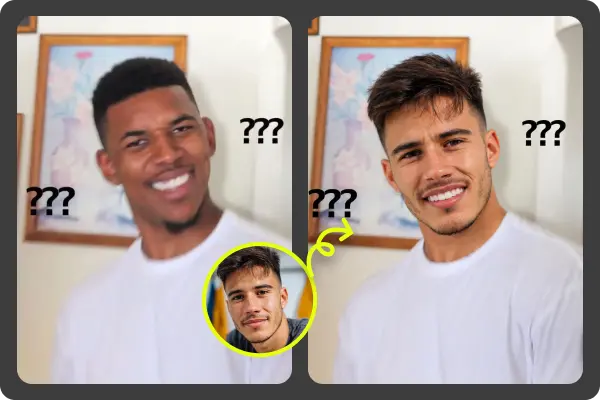
A face swap can look surprisingly real, but the photo you choose does most of the work. I’ve tested swaps that looked almost natural with one image, then strange and plastic with another photo of the same person. The difference usually came down to angle, light, sharpness, expression, and how much of the face the AI could clearly read.
If you’re using a Photo Face Swap, don’t start with the funniest or most dramatic picture in your camera roll. Start with the cleanest one. AI tools can do a lot, but they still struggle when a face is hidden by shadows, glasses glare, motion blur, heavy filters, or a tilted angle that doesn’t match the target image.
I’ve found that EasyFaceSwap works best when the source and target photos feel like they came from the same scene. They don’t need to be identical, but they should share a similar direction of light, face angle, and mood. That’s what makes the swap feel like a photo rather than a pasted mask.
AI face swap tools look for facial landmarks, such as the eyes, nose, mouth, jawline, and cheek shape. When those points are clear, the software can blend the face with better proportion and texture. When those points are blocked or distorted, the result can look off even if the person is easy for you to recognize.
The best photos are not always the most polished ones. A sharp phone selfie in natural window light can work better than a studio portrait with heavy smoothing. Overedited skin, strong beauty filters, and harsh contrast can remove the details the AI needs to match the face well.
It also helps to think about the final image before choosing your source photo. If the target person is looking slightly left, use a source photo with a similar head turn. If the target has a soft smile, don’t use a wide grin with teeth showing unless you want the mouth area to look stretched or unnatural.
1. A clear front-facing portrait. Overview: This is the safest photo type for most face swaps because the AI can see both sides of the face evenly. The key features are sharp eyes, visible jawline, even lighting, and a neutral camera angle. The main pro is reliability, while the con is that it can look too plain if the target image has a more dramatic pose. Best for profile-style swaps, ID-style edits, and any project where accuracy matters more than flair.
2. A three-quarter angle portrait. Overview: A three-quarter photo shows the face turned slightly to one side, which often feels more natural than a straight-on shot. Its key features are one cheek slightly closer to the camera, both eyes still visible, and a clear nose bridge. The pro is that it adds depth and realism, but the con is that it must match the target angle closely. Best for lifestyle images, social posts, and swaps where the target person isn’t looking directly at the camera.
3. A photo in soft natural light. Overview: Soft daylight, especially near a window or outdoors in shade, gives the AI useful skin detail without harsh shadows. The key features are smooth light, natural color, and visible texture around the eyes and mouth. The pro is a more believable blend, while the con is that it may not match a target image shot under strong indoor light. Best for casual portraits, family photos, and natural-looking edits.
4. A high-resolution close-up. Overview: A close-up gives the AI more facial information, which helps with skin texture, eye shape, and mouth details. The key features are high sharpness, no motion blur, and enough pixels around the face for clean mapping. The pro is better detail, but the con is that extreme close-ups can distort the nose and cheeks if shot too near the lens. Best for swaps where the final image is large, cropped, or meant to be viewed on a bigger screen.
5. A neutral-expression photo. Overview: A relaxed face gives the AI a balanced base to work from. The key features are closed lips or a soft smile, relaxed eyebrows, and no strong squinting. The pro is that neutral faces adapt well to many target images, while the con is that they may not carry enough emotion for funny or dramatic swaps. Best for professional-looking edits, clean portraits, and cases where you want the face to blend without drawing attention.
6. A matching-expression photo. Overview: This is the photo to use when the target face is laughing, surprised, serious, or making a clear expression. The key features are a similar mouth shape, eye tension, and eyebrow position. The pro is that it can make the final image feel much more alive, but the con is that a mismatch looks obvious fast. Best for memes, reaction images, performance shots, and any swap where emotion is the point.
7. A photo without glasses or face coverings. Overview: A bare face gives the AI the cleanest read of the eyes, nose, and cheek structure. The key features are no sunglasses, no mask, no hair across the eyes, and no heavy hands or props blocking the face. The pro is cleaner facial mapping, while the con is that it may not match a target image where the person is wearing glasses. Best for first attempts, realistic portrait swaps, and projects where you want fewer weird edges around the eyes.
8. A photo with similar lighting direction. Overview: This photo type matches where the light comes from in the target image, such as left side, right side, or front. The key features are shadows that fall in a similar direction and highlights on the same side of the face. The pro is a stronger illusion of realism, but the con is that it takes more time to find the right match. Best for cinematic edits, fashion-style images, and swaps where the target photo has clear shadow and mood.
9. A lightly edited, natural skin photo. Overview: Light editing is fine, but the face should still have normal texture. The key features are realistic pores, natural color, and no heavy smoothing or cartoon-like filters. The pro is that the AI can preserve real detail, while the con is that blemishes or uneven light may carry into the result if the tool doesn’t correct them. Best for realistic social media portraits, dating-style photos, and edits where the final face should still look human.
10. A photo taken from a similar distance. Overview: Distance affects face shape more than people expect. A selfie taken very close can make the nose look larger, while a photo taken from farther away often flattens the face in a more flattering way. The pro is that matching distance helps the swap sit naturally on the target head, but the con is that most casual galleries mix many lens distances. Best for full-body images, group photos, and swaps where the face is not the only focus.
| Rank | Photo type | Best use |
|---|---|---|
| 1 | Clear front-facing portrait | Most reliable all-purpose swaps |
| 2 | Three-quarter angle portrait | Natural lifestyle edits |
| 3 | Soft natural light photo | Realistic skin and color |
| 4 | High-resolution close-up | Large or cropped final images |
| 5 | Neutral-expression photo | Clean, flexible portrait swaps |
| 6 | Matching-expression photo | Funny, emotional, or dramatic edits |
| 7 | No glasses or coverings | Cleaner eye and nose mapping |
| 8 | Similar lighting direction | More believable shadow blending |
| 9 | Lightly edited natural skin photo | Human-looking texture |
| 10 | Similar-distance photo | Better proportions in full images |
This table is how I usually narrow down choices when several photos seem usable. I don’t always pick the technically sharpest image. I pick the image that gives the AI the most similar face angle, light, and expression to the target.
The most common mistake is using a photo that looks good to you but gives the AI too little information. A moody portrait with half the face in shadow may look great on Instagram, but it often creates a patchy swap. Dark eye sockets, hidden jawlines, and blown-out highlights can confuse the blend.
Another issue is choosing a photo with a big mismatch in expression. If your source face has a wide open smile and the target face has closed lips, the mouth area may look warped. Teeth are especially tricky because AI tools need to blend shape, color, and alignment in a small space.
Heavy filters can also ruin an otherwise useful photo. Skin smoothing, enlarged eyes, sharpened lips, and face reshaping may make the original image more flattering, but they remove the natural cues that help a swap look real. If you have both the edited and unedited version, use the unedited one first.
Group photos are possible, but they’re not my first choice for the source face. Faces are often smaller, softer, or partly turned away. If you need to use one, crop the person’s face clearly and make sure the crop still has enough resolution.
If you want the most realistic AI face swap, start with a sharp front-facing or three-quarter portrait in soft natural light. Keep the expression close to the target image, avoid heavy filters, and choose a photo where the full face is visible. Those simple choices usually matter more than the tool settings.
For the best single pick, I’d choose a clear three-quarter portrait with soft light and a relaxed expression. It gives the AI enough detail while still looking natural in many real-life scenes. If that doesn’t match the target angle, use the closest matching angle instead, even if the photo is a little less polished.
A realistic face swap is less about finding the “perfect” photo and more about finding the right match. When the angle, lighting, expression, and image quality work together, the final result looks far more believable. Start with those basics, and you’ll avoid most of the strange, fake-looking results people blame on the AI.
